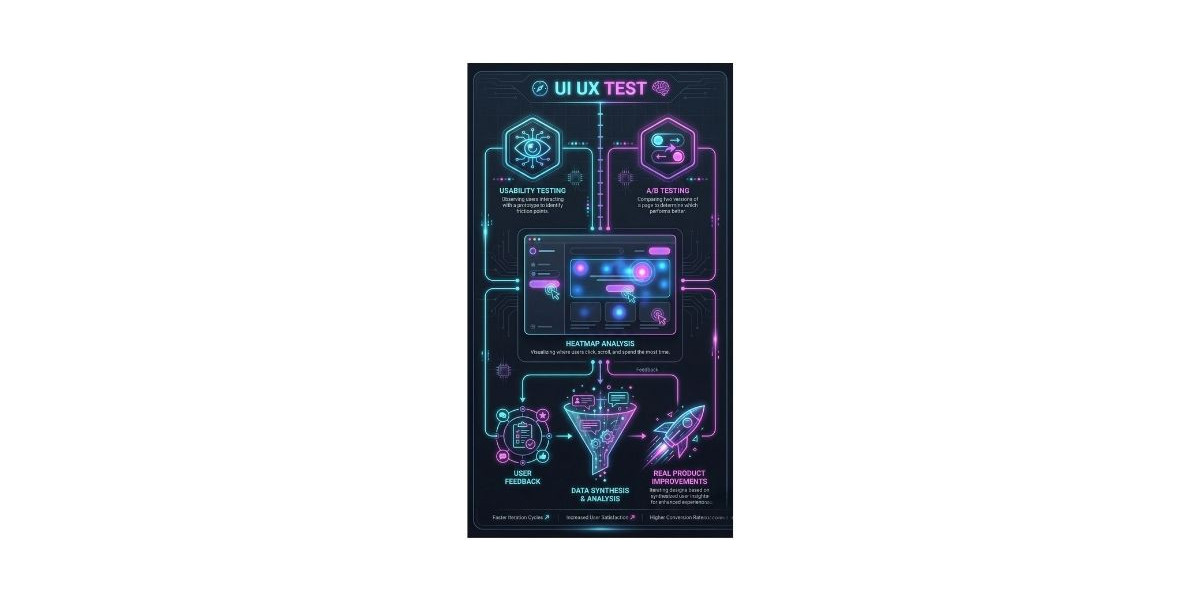

When businesses talk about product improvement, the key is not just collecting user feedback but acting on it effectively. A well-planned UI/UX test helps teams identify usability issues, test design assumptions, and make changes that improve both functionality and user satisfaction
UI/UX testing goes beyond visual preferences. It examines how users interact with your interface, where they face friction, and which features deliver real value. Done correctly, testing informs design changes, guides development priorities, and confirms whether a product meets user expectations. It ensures product decisions are based on actual behavior, not assumptions.
Understanding the Types of UI/UX Testing
UI/UX testing can be split into qualitative and quantitative approaches:
Qualitative Testing: Focuses on understanding user behavior and motivations. Methods include usability testing, session recordings, and in-depth interviews. These methods reveal why users behave a certain way and uncover subtler pain points.\
Quantitative Testing: Uses measurable data to identify patterns and trends. Examples include A/B testing, analytics tracking, and rating-based surveys. Quantitative testing helps measure the effect of design changes across a larger audience.
Combining both approaches ensures a balance between detailed insights and measurable results, making product decisions grounded in reality.
Usability Testing: Observing Real User Interactions
Usability testing is the foundation of practical UI/UX evaluation. It involves observing users as they complete real tasks on your product. This method reveals friction points, confusing navigation, and unmet expectations.
Key tips for effective usability testing:
Select participants that represent your target users, not internal teams familiar with the product.
Use realistic tasks that reflect common user goals, such as completing a checkout or finding content.
Encourage users to verbalize their thought process, revealing hidden assumptions and frustrations.
Record sessions for later review. This allows teams to compare behavior across multiple users and spot consistent issues.
Example: An e-commerce platform discovered users struggled to locate shipping options during checkout. Adjusting layout and labeling based on these insights reduced cart abandonment and improved conversion rates.
A/B Testing: Comparing Alternatives in Real Time
A/B testing compares different versions of a page or feature to see which performs better. Unlike usability testing, it measures user behavior in real-world conditions.
Steps for effective A/B testing:
Identify the element to test, such as button placement, call-to-action, or onboarding flow.
Split the audience into groups to see different versions.
Measure success based on pre-defined goals like clicks, form completions, or conversions.
Analyze results and implement the better-performing version.
Use case: A SaaS platform tested two sign-up flows. Version A asked for minimal information upfront, while Version B requested more details initially. Version A increased sign-ups by 18%, guiding a permanent update and reducing drop-off in onboarding.
Heatmaps and Session Recordings: Visualizing Behavior
Heatmaps and session recordings show how users interact with your product, helping identify areas of attention or confusion.
Heatmaps show which areas users click, hover, or scroll over most often.
Session Recordings allow teams to watch full user journeys, capturing navigation patterns, errors, and unexpected behaviors.
These tools are particularly useful for spotting subtle issues, such as users repeatedly clicking non-interactive elements, indicating a need for clearer design or labels.
Surveys and Feedback Widgets: Collecting Contextual Insights
Direct feedback helps identify user needs and frustrations that observation might miss. Surveys and embedded feedback widgets provide contextual insights during the current user experience.
Tips for actionable feedback:
Ask questions relevant to the user's current journey.
Keep surveys short to maximize completion rates.
Include open-ended questions to capture nuanced opinions.
Combine responses with behavioral data for richer analysis.
Example: A mobile app implemented an in-app survey asking why users abandoned a feature. Responses highlighted confusing terminology, prompting a simpler and more intuitive interface update.
Remote Testing: Expanding Reach and Diversity
Remote testing collects feedback from users regardless of location. Modern tools allow screen sharing, task completion logging, and click tracking, making remote testing cost-effective and scalable.
Advantages:
Access to a wider and more diverse user base.
Testing in users' natural environment reveals real-world usage challenges
Flexible scheduling allows asynchronous participation, reducing logistical constraints.
Remote testing often combines multiple methods, such as usability tests, surveys, and session recordings, providing a well-rounded view of user behavior.
Translating Data into Product Improvements
Collecting feedback is only valuable if it leads to tangible improvements. Converting insights from Ui Ux Test results requires a structured approach:
Categorize Issues: Group feedback into topics like navigation problems, content clarity, or feature discoverability.
Prioritize by Impact: Address issues affecting key tasks or user retention first.
Define Clear Actions: Turn observations into specific design or development tasks.
Iterate and Retest: Implement changes and validate improvements with subsequent testing rounds.
Short feedback loops are essential. Acting promptly on insights ensures that testing translates into real product improvements rather than becoming unused data.
Integrating Testing into the Product Lifecycle
Advanced UI/UX testing should be continuous, not a one-time activity. Integrating testing into the product lifecycle ensures design decisions remain aligned with user needs.
Conduct usability tests during early design to catch issues before development.
Run A/B tests when launching new features to assess real-world performance.
Use heatmaps and session recordings for ongoing monitoring and minor adjustments.
Collect continuous user feedback through embedded surveys to stay informed about evolving needs.
This iterative approach reduces the risk of costly redesigns and ensures updates are guided by real user data.
Conclusion
Advanced UI/UX testing turns user feedback into actionable improvements. By combining usability testing, A/B experiments, heatmaps, session recordings, and targeted surveys, teams can identify friction points, validate design decisions, and improve user satisfaction. Integrating testing into the product lifecycle, prioritizing feedback by impact, and acting quickly ensures meaningful changes that align with real user needs.
FAQs about UI/UX testing
Q.1 What is the difference between qualitative and quantitative UI/UX testing?
Ans: Qualitative testing captures insights about user behavior and motivations, while quantitative testing measures patterns and trends through data.
Q.2 How often should UI/UX testing be conducted?
Ans: Testing should be continuous, including usability tests during design, A/B tests for new features, and ongoing monitoring with analytics and surveys.
Q.3 Can small businesses benefit from advanced UI/UX testing?
Ans: Yes. Even limited testing provides actionable insights, helping small teams make informed design decisions without heavy costs.
Q.4 What tools are recommended for session recordings and heatmaps?
Ans: Tools like Hotjar, Crazy Egg, and FullStory track clicks, scrolls, and user behavior for practical insights.
Q.5 How do I ensure feedback leads to real improvements?
Ans: Categorize issues, prioritize by impact, define clear actions, implement changes, and retest to confirm improvements.