
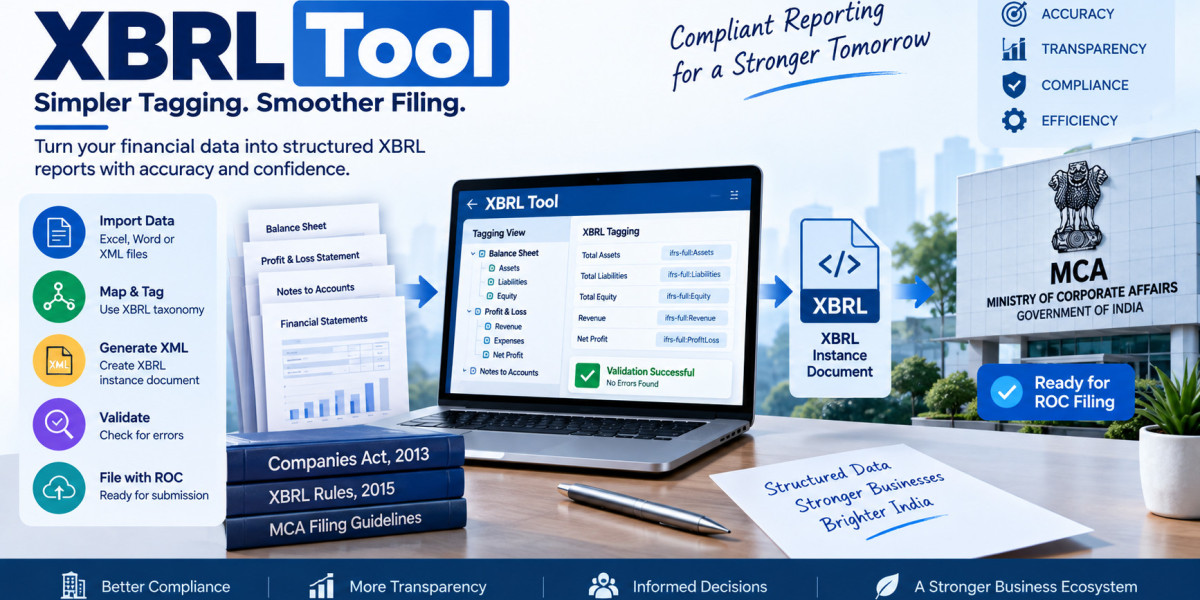

An XBRL tool helps companies and finance professionals convert financial information into a structured XBRL format for regulatory reporting. Instead of preparing every tag and validation check manually, an XBRL tool can bring mapping, tagging, data import, XML generation and validation into one workflow. For companies preparing annual reports, using dedicated XBRL Tool software can make the preparation process more organized and easier to review.
XBRL is used to represent business and financial information in a structured, machine-readable format. In India, applicable companies use XBRL-based filing processes for relevant MCA filings, making accurate tagging and validation important parts of the reporting workflow.
What is an XBRL Tool?
An XBRL tool is software designed to help prepare financial and business information according to an applicable XBRL taxonomy. It can assist with converting information from financial statements and other documents into an XBRL instance document.
A typical XBRL workflow includes:
- Importing or entering financial data
- Mapping data to XBRL concepts
- Tagging financial and non-financial information
- Generating an XBRL instance document
- Checking validation errors
- Reviewing the final output
- Preparing the validated document for the applicable MCA filing
MCA's filing manual explains that the XBRL instance document attached to AOC-4 XBRL needs to be validated and pre-scrutinized before submission.
Key Features of an XBRL Tool
Different software solutions offer different capabilities, but the following features are particularly useful:
| Feature | How It Helps |
|---|---|
| Data Import | Reduces repetitive manual data entry |
| Mapping & Tagging | Connects financial information with appropriate XBRL concepts |
| XML Generation | Creates the XBRL instance document |
| Validation | Helps identify technical errors |
| Error Locator | Makes it easier to find issues in the prepared file |
| Previous-Year Data | Helps reuse relevant information from earlier reporting periods |
| Backup & Restore | Helps protect working data |
Webtel's Web-XBRL solution includes XML generation, data import/export, mapping and tagging, in-built validation and previous-year data handling.
How Does an XBRL Tool Work?
The process generally starts with collecting the company's financial statements and supporting information. The relevant information is then matched with concepts in the applicable taxonomy.
After mapping, the required information is tagged. The software can then generate an XBRL instance document containing the structured data.
The next stage is validation. Validation helps identify technical issues before the document moves to the filing stage. This is important because an incorrectly prepared instance document may require corrections and another validation cycle.
MCA released XBRL Validation Tool V5.1 for C&I and IND-AS taxonomies in July 2025 and advised stakeholders to use the updated validation tool while filing AOC-4 XBRL.
XBRL Tool for Different Reporting Requirements
XBRL requirements can differ depending on the type of report being prepared. Financial statement reporting and cost audit or compliance reporting can involve different taxonomies and workflows.
For organizations handling cost audit or compliance reports, a dedicated Cost-XBRL Filing Software can be used to convert applicable reports into XBRL format.
Webtel's Cost-XBRL solution includes features such as Excel data import, Word report import, text block tagging, product-group creation, in-built validations, cross-referencing and generation of a Cost Instance Document.
MCA's Cost XBRL filing manual also states that the MCA XBRL validation tool for the costing taxonomy is a prerequisite for validating the instance document before filing the applicable cost audit or compliance report.
Why Is Validation Important in XBRL?
XBRL reporting involves a combination of financial data, taxonomy concepts, contexts, units, periods and other technical information. A validation process helps identify issues within the instance document before submission.
Common checks may include:
- Incorrect or incomplete information
- Mapping-related issues
- Calculation inconsistencies
- Invalid formats
- Missing mandatory information
- Opening and closing balance mismatches
An XBRL tool with built-in validation can therefore reduce the amount of manual checking required during preparation.
What Should You Check Before Choosing an XBRL Tool?
Before selecting an XBRL solution, companies and professionals can compare the software based on their reporting requirements.
Important factors include:
- Taxonomy support - Check whether the software supports the taxonomy relevant to the filing.
- Mapping and tagging - Look for tools that simplify tagging of financial statements and disclosures.
- Validation - Check whether the software supports required validation processes.
- Data import - Excel, Word or XML import can reduce repetitive work.
- Previous-year data - Reusing relevant historical information can simplify recurring filings.
- Updates - XBRL software should be updated when applicable reporting requirements or validation tools change.
- Support and backup - Technical assistance and backup facilities can be useful during the preparation process.
Webtel's current Web-XBRL update, released on September 15, 2026, includes previous-year XML data import, a "Current Year Tagging Only" option and validation for incorrect CIN/PAN formats.
Frequently Asked Questions
What is an XBRL tool?
An XBRL tool is software that helps prepare structured business and financial information using XBRL taxonomy, mapping, tagging, validation and instance-document generation.
Is an XBRL tool the same as an XBRL validation tool?
Not necessarily. An XBRL software solution may include preparation and validation features, while an official validation tool is specifically used to validate the generated instance document.
Why is XBRL tagging required?
Tagging connects reported information with standardized XBRL concepts so that the information can be processed in a structured and machine-readable format.
Can the same XBRL tool be used for Cost-XBRL?
It depends on the software. Cost reporting uses the applicable costing taxonomy and may require a dedicated workflow and validation process.
Conclusion
An XBRL tool can simplify several stages of structured financial reporting, from data import and mapping to tagging, XML generation and validation. When choosing a solution, companies and professionals should consider taxonomy support, validation capabilities, data handling, software updates and the specific type of XBRL reporting they need to complete.